Android打包
打包过程
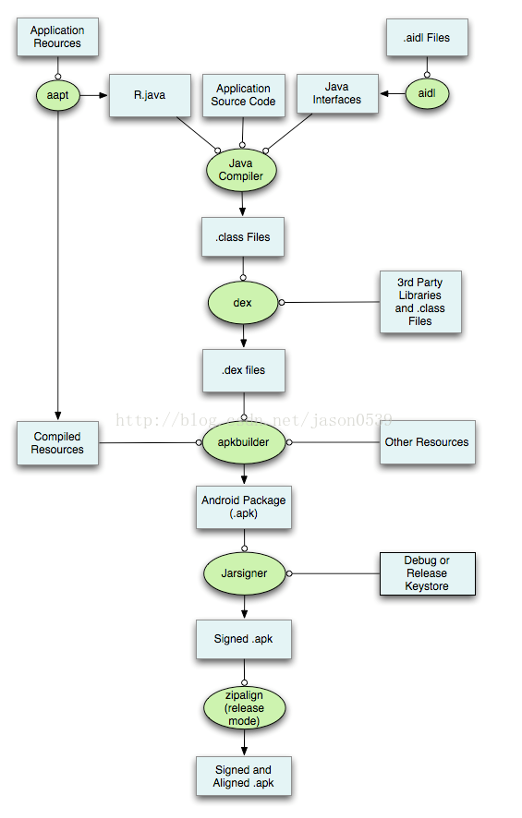
aapt->aidl -> javac-> dx(dex)-> apkbuilder-> jarsigner-> zipalign
步骤中提到的工具如下表:
| 名称 | 功能介绍 | 在操作系统中的路径 |
|---|---|---|
| aapt | Android资源打包工具 | ${ANDROID_SDK_HOME}/platform-tools/appt |
| aidl | Android接口描述语言转化为.java文件的工具 | ${ANDROID_SDK_HOME}/platform-tools/aidl |
| javac | Java Compiler | ${JDK_HOME}/javac或/usr/bin/javac |
| dex | 转化.class文件为Davik VM能识别的.dex文件 | ${ANDROID_SDK_HOME}/platform-tools/dx |
| apkbuilder | 生成apk包 | ${ANDROID_SDK_HOME}/tools/opkbuilder |
| jarsigner | .jar文件的签名工具 | ${JDK_HOME}/jarsigner或/usr/bin/jarsigner |
| zipalign | 字节码对齐工具 | ${ANDROID_SDK_HOME}/tools/zipalign |
第一步:打包资源文件,生成R.java文件
编译R.java类需要用到AndroidSDK提供的aapt工具,aapt参数众多,以下是主要参数:
-d one or more device assets to include, separated by commas
-f force overwrite of existing files
-g specify a pixel tolerance to force images to grayscale, default 0
-j specify a jar or zip file containing classes to include
-k junk path of file(s) added
-m make package directories under location specified by -J
-u update existing packages (add new, replace older, remove deleted files)
-v verbose output
-x create extending (non-application) resource IDs
-z require localization of resource attributes marked with
localization=“suggested”
-A additional directory in which to find raw asset files
-G A file to output proguard options into.
-F specify the apk file to output
-I add an existing package to base include set
-J specify where to output R.java resource constant definitions
-M specify full path to AndroidManifest.xml to include in zip
-P specify where to output public resource definitions
-S directory in which to find resources. Multiple directories will be scann
第二步:处理AIDL文件,生成对应的.java文件
(当然,有很多工程没有用到AIDL,那这个过程就可以省了)
将.aidl文件生成.java文件需要用到AndroidSDK自带的aidl工具,此工具具体参数如下:
-I search path for import statements.
-d generate dependency file.
-p file created by –preprocess to import.
-o base output folder for generated files.
-b fail when trying to compile a parcelable.
第三步:编译Java文件,生成对应的.class文件
javac命令用法如下:
其中,可能的选项包括:
-g 生成所有调试信息
-g:none 不生成任何调试信息
-g:{lines,vars,source} 只生成某些调试信息
-nowarn 不生成任何警告
-verbose 输出有关编译器正在执行的操作的消息
-deprecation 输出使用已过时的 API 的源位置
-classpath <路径> 指定查找用户类文件和注释处理程序的位置
-cp <路径> 指定查找用户类文件和注释处理程序的位置
-sourcepath <路径> 指定查找输入源文件的位置
-bootclasspath <路径> 覆盖引导类文件的位置
-extdirs <目录> 覆盖安装的扩展目录的位置
-endorseddirs <目录> 覆盖签名的标准路径的位置
-proc:{none,only} 控制是否执行注释处理和/或编译。
-processor [,,…]要运行的注释处理程序的名称;绕过默认的搜索进程
-processorpath <路径> 指定查找注释处理程序的位置
-d <目录> 指定存放生成的类文件的位置
-s <目录> 指定存放生成的源文件的位置
-implicit:{none,class} 指定是否为隐式引用文件生成类文件
-encoding <编码> 指定源文件使用的字符编码
-source <版本> 提供与指定版本的源兼容性
-target <版本> 生成特定 VM 版本的类文件
-version 版本信息
-help 输出标准选项的提要
-Akey[=value] 传递给注释处理程序的选项
-X 输出非标准选项的提要
-J<标志> 直接将 <标志> 传递给运行时系统
第四步:把.class文件转化成Davik VM支持的.dex文件
将工程bin目录下的class文件编译成classes.dex,Android虚拟机只能执行dex文件!

第五步:打包生成未签名的.apk文件
【输入】打包后的资源文件、打包后类文件(.dex文件)、libs文件(包括.so文件,当然很多工程都没有这样的文件,如果你不使用C/C++开发的话)
【输出】未签名的.apk文件
【工具】apkbuilder工具
apkbuilder工具用法如下:
-v Verbose.
-d Debug Mode: Includes debug files in the APK file.
-u Creates an unsigned package.
-storetype Forces the KeyStore type. If ommited the default is used.
-z Followed by the path to a zip archive.
Adds the content of the application package.
-f Followed by the path to a file.
Adds the file to the application package.
-rf Followed by the path to a source folder.
Adds the java resources found in that folder to the application
package, while keeping their path relative to the source folder.
-rj Followed by the path to a jar file or a folder containing
jar files.
Adds the java resources found in the jar file(s) to the application
package.
-nf Followed by the root folder containing native libraries to
include in the application package.
第六步:对未签名.apk文件进行签名
【输入】未签名的.apk文件
【输出】签名的.apk文件
【工具】jarsigner
用法:jarsigner [选项] jar 文件别名
jarsigner -verify [选项] jar 文件
[-keystore ] 密钥库位置
[-storepass <口令>] 用于密钥库完整性的口令
[-storetype <类型>] 密钥库类型
[-keypass <口令>] 专用密钥的口令(如果不同)
[-sigfile <文件>] .SF/.DSA 文件的名称
[-signedjar <文件>] 已签名的 JAR 文件的名称
[-digestalg <算法>] 摘要算法的名称
[-sigalg <算法>] 签名算法的名称
[-verify] 验证已签名的 JAR 文件
[-verbose] 签名/验证时输出详细信息
[-certs] 输出详细信息和验证时显示证书
[-tsa ] 时间戳机构的位置
[-tsacert <别名>] 时间戳机构的公共密钥证书
[-altsigner <类>] 替代的签名机制的类名
[-altsignerpath <路径列表>] 替代的签名机制的位置
[-internalsf] 在签名块内包含 .SF 文件
[-sectionsonly] 不计算整个清单的散列
[-protected] 密钥库已保护验证路径
[-providerName <名称>] 提供者名称
[-providerClass <类> 加密服务提供者的名称
[-providerArg <参数>]] … 主类文件和构造函数参数
第七步:对签名后的.apk文件进行对齐处理
(不进行对齐处理是不能发布到Google Market的)
【输入】签名后的.apk文件
【输出】对齐后的.apk文件
【工具】zipalign工具
知道了这些细节之后,我们就可以实现很多我们想实现东西了,比如:自动化,我们可以使用某种脚本,像Windows下的批处理,linux下的Bash,Java下的Ant,Python、Perl这样的脚本语言,甚至直接用Java、.net这们的强类型语言也是可以的。
参考
http://www.jb51.net/article/106101.htm
R.java位置:
Moule path/build/generated/source/r/debug/…R.java
资源打包流程: