路由
原理
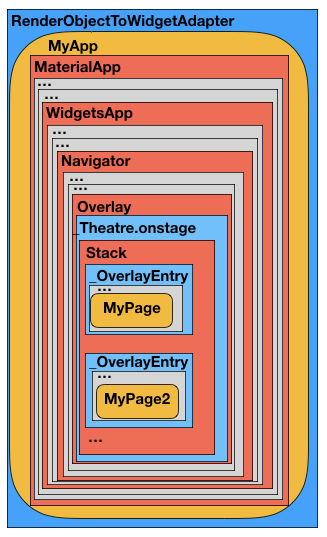
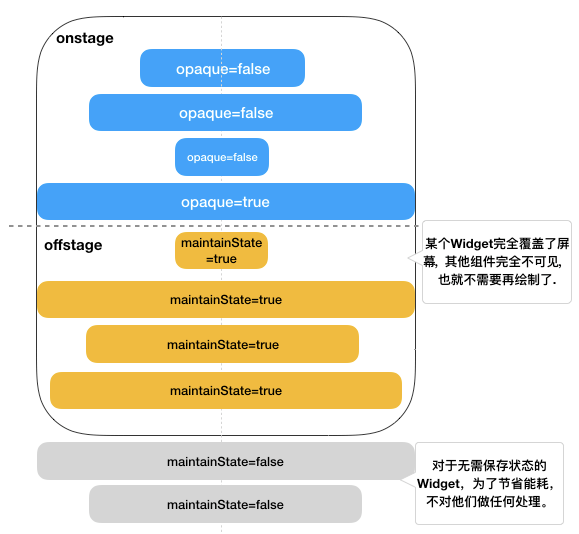
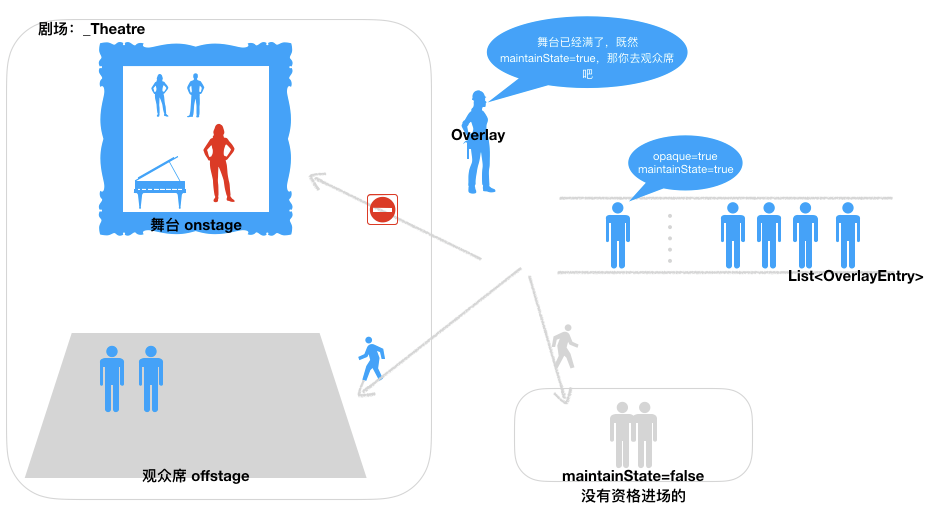
可能你会比较好奇_Theatre中 offstage 是如何做到不绘制的。
你应该知道 Element 树的是通过其内部的mout方法将自己挂载到父 Element 上的。_Theatre的 mout方法不太一样, onstage走正常的挂载流程,加入到Element 树中; offstage集合中的 Widget 仅创建了对应的 Element,并没有挂载到 Element 树中。没有进入到Element中,也就不会进入到 RenderObject树中,也就不走到绘制流程了。
这样你应该能理解Overlay其实是Stack的扩展。Overlay预先进行过滤,从而避免了无用的绘制。
我们看下当路由中只有一个 Page 时的示意图:
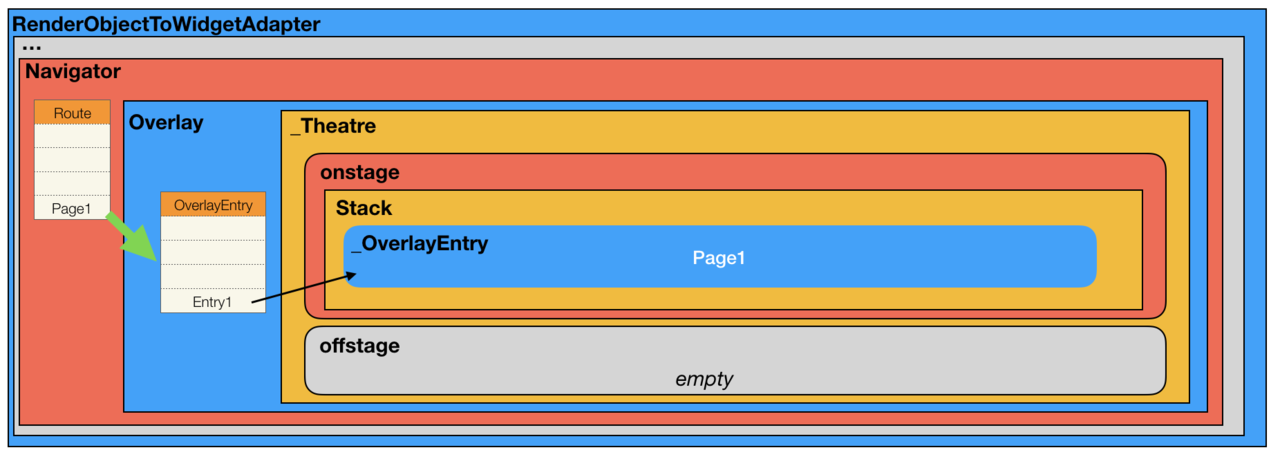
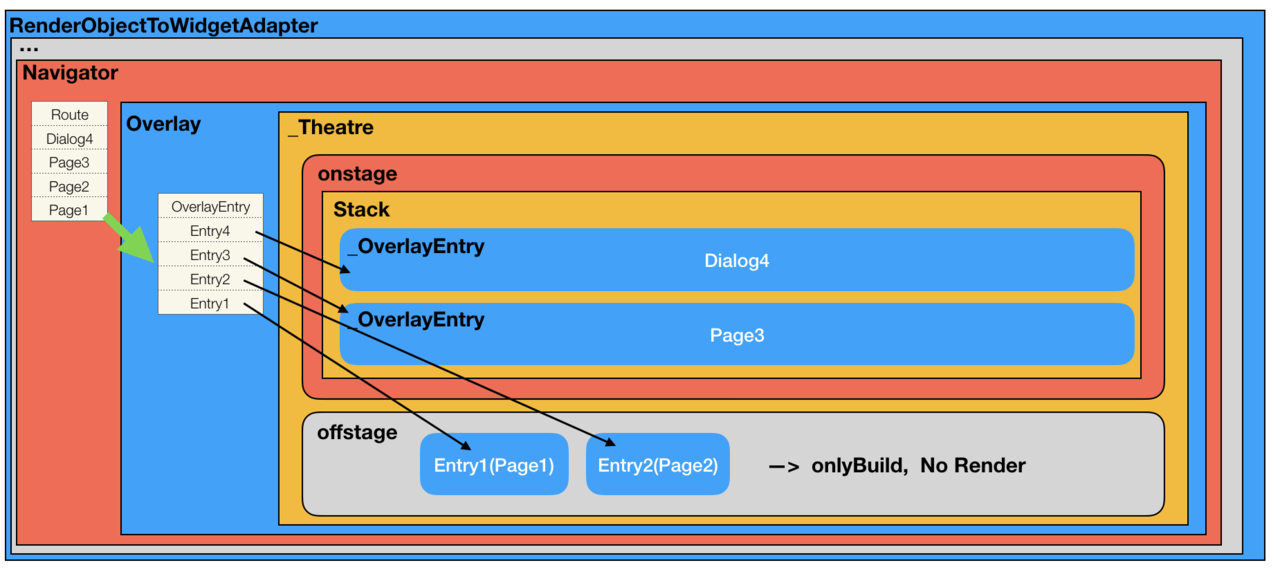
我们再看下当路由中又被 push 进一个 Page时的情况:
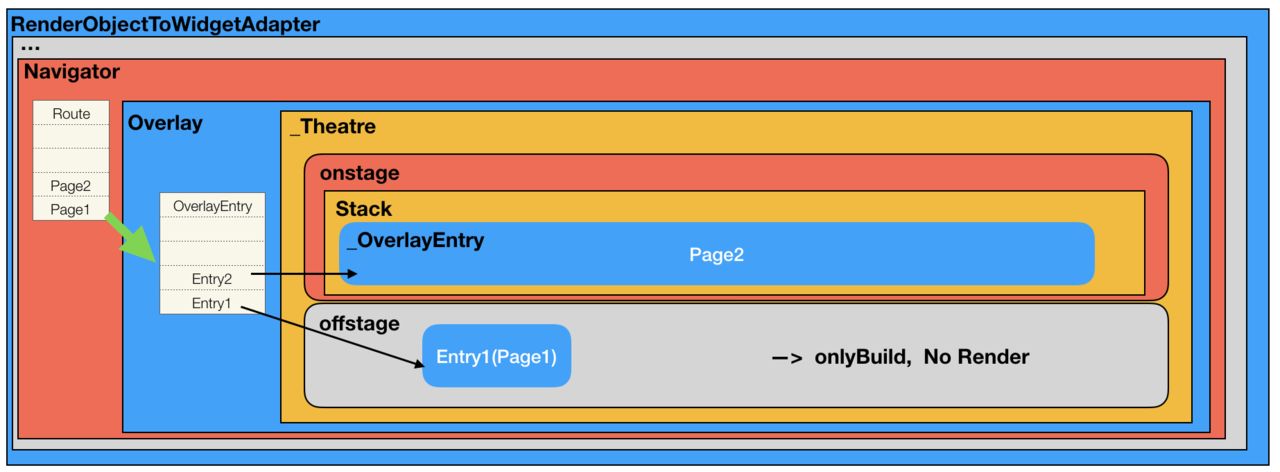
因为通常 Page 的 opaque=true, maintainState=true,所以 Page2 进入 onstage, Page1 不在需要被绘制,但需要保持状态,进入了offstage。
因为通常 popupWindow(dialog) 的 opaque=false,我们再向路由中 push 一个 dialog:
类设计
Usage
Navigator 1.0
**Navigator**— a widget that manages a stack of Route objects.**Route**— an object managed by aNavigatorthat represents a screen, typically implemented by classes likeMaterialPageRoute.
Anonymous routes
           Navigator.push(
              context,
              MaterialPageRoute(builder: (context) {
                return DetailScreen();
              }),
            );
Named routes
    return MaterialApp(
      routes: {
        '/': (context) => HomeScreen(),
        '/details': (context) => DetailScreen(),
      },
    );

            Navigator.pushNamed(
              context,
              '/details',
            );
These routes must be predefined. Although you can pass arguments to a named route, you can’t parse arguments from the route itself. For example, if the app is run on the web, you can’t parse the ID from a route like /details/:id.
Advanced named routes with onGenerateRoute
A more flexible way to handle named routes is by using onGenerateRoute. This API gives you the ability to handle all paths:
return MaterialApp(
      onGenerateRoute: (settings) {
        // Handle '/'
        if (settings.name == '/') {
          return MaterialPageRoute(builder: (context) => HomeScreen());
        }

        // Handle '/details/:id'
        var uri = Uri.parse(settings.name);
        if (uri.pathSegments.length == 2 &&
            uri.pathSegments.first == 'details') {
          var id = uri.pathSegments[1];
          return MaterialPageRoute(builder: (context) => DetailScreen(id: id));
        }

        return MaterialPageRoute(builder: (context) => UnknownScreen());
      },
    );

          Navigator.pushNamed(
              context,
              '/details/1',
            );
Here, settings is an instance of RouteSettings. The name and arguments fields are the values that were provided when Navigator.pushNamed was called, or what initialRoute is set to.
Navigator 2.0
The Navigator 2.0 API adds new classes to the framework in order to make the app’s screens a function of the app state and to provide the ability to parse routes from the underlying platform (like web URLs). Here’s an overview of what’s new:
**Page**— an immutable object used to set the navigator’s history stack.**Router**— configures the list of pages to be displayed by the Navigator. Usually this list of pages changes based on the underlying platform, or on the state of the app changing.**RouteInformationParser**, which takes theRouteInformationfromRouteInformationProviderand parses it into a user-defined data type.**RouterDelegate**— defines app-specific behavior of how theRouterlearns about changes in app state and how it responds to them. Its job is to listen to theRouteInformationParserand the app state and build theNavigatorwith the current list ofPages.**BackButtonDispatcher**— reports back button presses to theRouter.
The following diagram shows how the RouterDelegate interacts with the Router, RouteInformationParser, and the app’s state:
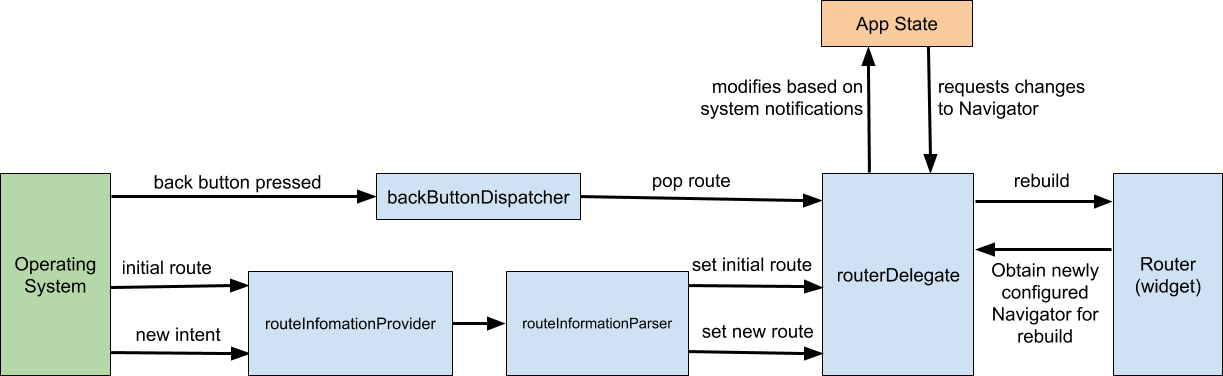
Here’s an example of how these pieces interact:
- When the platform emits a new route (for example, “books/2”) , the
RouteInformationParserconverts it into an abstract data typeTthat you define in your app (for example, a class calledBooksRoutePath). RouterDelegate’ssetNewRoutePathmethod is called with this data type, and must update the application state to reflect the change (for example, by setting theselectedBookId) and callnotifyListeners.- When
notifyListenersis called, it tells theRouterto rebuild theRouterDelegate(using itsbuild()method) RouterDelegate.build()returns a newNavigator, whose pages now reflect the change to the app state (for example, theselectedBookId).
    return MaterialApp(
      title: 'Books App',
      home: Navigator(
        pages: [
          MaterialPage(
            key: ValueKey('BooksListPage'),
            child: Scaffold(),
          )
        ],
        onPopPage: (route, result) => route.didPop(result),
      ),
    );
Pages
The Navigator has a new pages argument in its constructor. If the list of Page objects changes, Navigator updates the stack of routes to match.
pages: [
  MaterialPage(
    key: ValueKey('BooksListPage'),
    child: BooksListScreen(
      books: books,
      onTapped: _handleBookTapped,
    ),
  ),
// New:
  if (show404)
    MaterialPage(key: ValueKey('UnknownPage'), child: UnknownScreen())
  else if (_selectedBook != null)
    MaterialPage(
        key: ValueKey(_selectedBook),
        child: BookDetailsScreen(book: _selectedBook))
],
Note that the key for the page is defined by the value of the book object. This tells the Navigator that this MaterialPage object is different from another when the Book object is different. Without a unique key, the framework can’t determine when to show a transition animation between different Pages.
Finally, it’s an error to provide a pages argument without also providing an onPopPage callback. This function is called whenever Navigator.pop() is called. It should be used to update the state (that determines the list of pages), and it must call didPop on the route to determine if the pop succeeded:
onPopPage: (route, result) {
  if (!route.didPop(result)) {
    return false;
  }

  // Update the list of pages by setting _selectedBook to null
  setState(() {
    _selectedBook = null;
  });

  return true;
},
It’s important to check whether didPop fails before updating the app state.
Using setState notifies the framework to call the build() method, which returns a list with a single page when _selectedBook is null.
Router
So far, the app can show different pages, but it can’t handle routes from the underlying platform, for example if the user updates the URL in the browser.
This section shows how to implement the RouteInformationParser, RouterDelegate, and update the app state. Once set up, the app stays in sync with the browser’s URL.
参考
https://flutter.dev/docs/development/ui/navigation